LINUX: chmod & chown — The File & Folder Access Control
chmod and chown are among those popular Linux commands.
chmod: To modify access to files and folders by providing read/write/execute permissions.
chown: To change the ownership of a file or folder.
chmod
There are two ways in which the permissions can be changed/set.
The symbolic method is the one where we mention:
Example :
To remove read and write permission from the group and other of file “myfile.txt”
chmod og-rw myfile.txt
To add execute permission to group of the file “myfile2.txt”
chmod g+x myfile2.txt
The numeric method (my personal favorite) adds up the numbers to determine what kind of permission a file should have:
Now here’s the magic:
1 = execute (1)
2 = write (2)
3 = write (2) + execute (1)
4 = read (4)
5 = read (4) + execute (1)
6 = read (4) + write (2)
7 = read (4) + write (2) + execute (1)
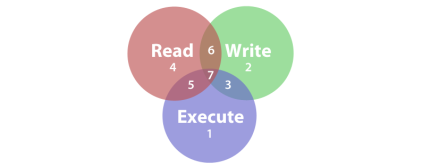
And the only extra thing to remember is the sequence of permission, it’s always
User -> Group -> Others
Example:
To set the permission for a file “myfile2.txt” such as:
a. User has full (read, write, and execute) permission …(read+write+execute = 4+2+1 = 7)
b. Group has read and write permission …(read+write = 4+2 = 6)
c. Others have only read permission …(read = 4)
chmod 764 myfile2.txt
Note: 777 is a very dangerous way to give permission, this gives everyone in the world full control over file.
chown
chown is pretty straightforward. Just remember that the syntax used for ownership is owner:group
Here are a few examples:
To make a user named bob the owner of a folder called MyDirectory:
chown bob MyFolder
To make a group name myGroup the owner of MyDirectory folder (notice the colon before group name, remember the owner:group pattern):
chown :myGroup MyDirectory
To make a user named john and a group named group2 the owner of folder MyDirectory:
chown john:group2 MyDirectory
About the author
A Tech Lead by profession, a Data Enthusiast and a forever learner. Experienced in DevOps, Cloud, FullStack Development, Data Science, Machine Learning and AI.
Comments
Join the discussionNo comments yet. Be the first to comment.


